> ## Documentation Index
> Fetch the complete documentation index at: https://docs.francis.app/llms.txt
> Use this file to discover all available pages before exploring further.
# Members and Roles
> Refer to the Members page to manage members and assign roles in your organization.
 ## Overview
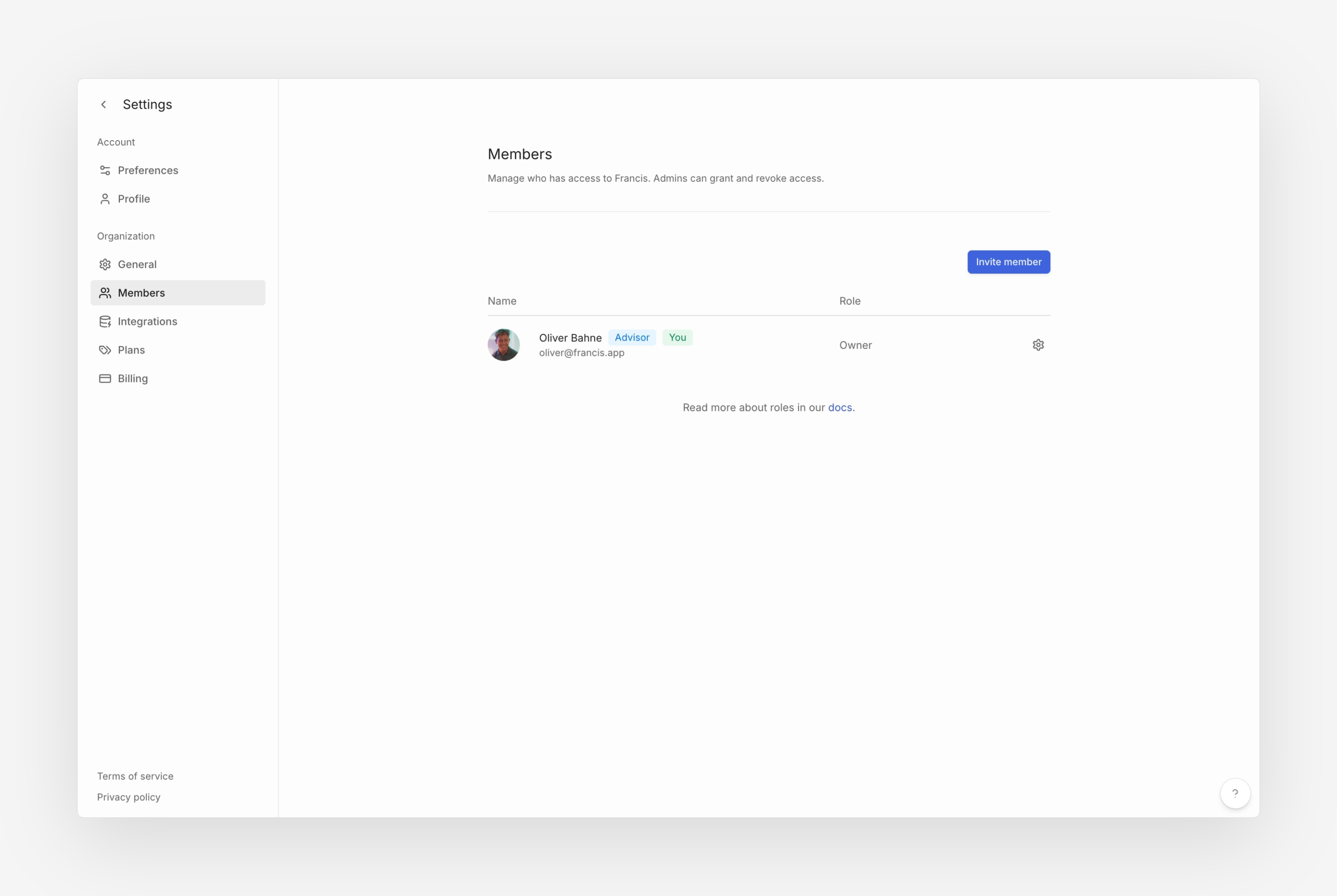
The Members page, which can be found by going to **Settings > Organization > Members**, shows a list of current and invited team members. In this view, you can see each member's role and check if they have a pending invitation. Owners and Admins can manage roles and invite new members.
## Managing members
### Inviting members
To invite members to your organization:
1. Go to **Settings > Organization > Members**
2. Click the **Invite member** button
3. Enter the invitee's email address
4. Select the role you want the invitee to have when joining
5. Click **Invite**. New members will receive an email with steps to join your organization.
Some email servers have a tendency to filter out invitation emails or mark them as spam. We recommend whitelisting [hi@francis.app](mailto:hi@francis.app) as a trusted sender in your email settings.
### Removing members
To remove members from your organization:
1. Go to **Settings > Organization > Members**
2. Click the gear icon next to the member's name
3. Select **Remove from organization...**
Once removed, the member immediately loses access to the organization. Any work they contributed remains in place, but they must be re-invited if they need access again. It is not possible to view removed members after this process.
## Roles
To manage roles, navigate to the Members page and click the gear icon next to the member. Francis currently supports five different roles – Owners, Admins, Editors, Viewers and Limited Viewers – all of which have different permissions and levels of access.
| Permissions | Owner | Admin | Editor | Viewer |
| :--------------------------------------------- | :---: | :---: | :----: | :----: |
| Transfer ownership | X | | | |
| Delete organization | X | | | |
| Invite and manage Owners | X | | | |
| Invite and manage Admins, Editors, and Viewers | X | X | | |
| Rename organization | X | X | | |
| Manage and update subscription | X | X | | |
| Manage and update billing details | X | X | | |
| View billing history, including invoices | X | X | | |
| Connect and configure data sources | X | X | X | |
| Sync connected data sources | X | X | X | |
| Update chart of account mappings | X | X | X | |
| Create and edit workbooks | X | X | X | |
| Create and edit charts | X | X | X | |
| Create and edit dashboards | X | X | X | |
| Set status indicators | X | X | X | |
| Set row descriptions | X | X | X | |
| Configure splits and breakdowns | X | X | X | |
| Update forecast start and last close | X | X | X | |
| View workbooks and reports | X | X | X | X |
| View charts and dashboards | X | X | X | X |
| Downloads reports | X | X | X | X |
| Export to Excel | X | X | X | X |
| View saved versions | X | X | X | X |
| View transactions drill-down | X | X | X | X |
| Comment and resolve threads | X | X | X | X |
### Owner
The user who creates the organization is assigned the Owner role and holds the highest level of access. Owners can invite, remove, promote, or demote any member, and they also manage all features and models. Only the Owner can terminate the organization.
### Admin
Admins share nearly all the same privileges as the Owner but cannot terminate the organization or modify the Owner's role. They have full access to every feature and model, and they can invite, remove, promote, or demote any team member other than the Owner.
### Editor
Editors have full access to all models and can collaborate on tasks like modeling, account mapping, forecasting, and consolidation. They do not, however, manage team members or have the ability to terminate the organization.
### Viewer
Viewers can see all models within the organization and may download reports and view transaction details. While they have complete visibility, they cannot make changes to models or manage team members.
### Limited viewer
Limited viewers are only available on [Mastery](https://francis.app/pricing) plans.
Limited Viewers share nearly the same privileges as Viewers but have access restricted to the specific sheets or models granted to them. This is especially useful for department heads or location managers who need targeted insight without seeing the entirety of your financial model. For more information about Limited Viewers, refer to our dedicated [documentation](/documentation/features/confidentiality/limited-viewers).
## FAQ
If you are currently assigned the *Owner* role and want to transfer ownership to another member of your organization, we suggest the following steps:
1. Promote the chosen member to the role of *Owner*.
2. Change your own role to *Admin*, *Editor*, or *Viewer*, depending on your preference.
Yes, Francis supports multiple *Owners*, allowing you to share ownership of your organization with multiple members.
## Overview
The Members page, which can be found by going to **Settings > Organization > Members**, shows a list of current and invited team members. In this view, you can see each member's role and check if they have a pending invitation. Owners and Admins can manage roles and invite new members.
## Managing members
### Inviting members
To invite members to your organization:
1. Go to **Settings > Organization > Members**
2. Click the **Invite member** button
3. Enter the invitee's email address
4. Select the role you want the invitee to have when joining
5. Click **Invite**. New members will receive an email with steps to join your organization.
Some email servers have a tendency to filter out invitation emails or mark them as spam. We recommend whitelisting [hi@francis.app](mailto:hi@francis.app) as a trusted sender in your email settings.
### Removing members
To remove members from your organization:
1. Go to **Settings > Organization > Members**
2. Click the gear icon next to the member's name
3. Select **Remove from organization...**
Once removed, the member immediately loses access to the organization. Any work they contributed remains in place, but they must be re-invited if they need access again. It is not possible to view removed members after this process.
## Roles
To manage roles, navigate to the Members page and click the gear icon next to the member. Francis currently supports five different roles – Owners, Admins, Editors, Viewers and Limited Viewers – all of which have different permissions and levels of access.
| Permissions | Owner | Admin | Editor | Viewer |
| :--------------------------------------------- | :---: | :---: | :----: | :----: |
| Transfer ownership | X | | | |
| Delete organization | X | | | |
| Invite and manage Owners | X | | | |
| Invite and manage Admins, Editors, and Viewers | X | X | | |
| Rename organization | X | X | | |
| Manage and update subscription | X | X | | |
| Manage and update billing details | X | X | | |
| View billing history, including invoices | X | X | | |
| Connect and configure data sources | X | X | X | |
| Sync connected data sources | X | X | X | |
| Update chart of account mappings | X | X | X | |
| Create and edit workbooks | X | X | X | |
| Create and edit charts | X | X | X | |
| Create and edit dashboards | X | X | X | |
| Set status indicators | X | X | X | |
| Set row descriptions | X | X | X | |
| Configure splits and breakdowns | X | X | X | |
| Update forecast start and last close | X | X | X | |
| View workbooks and reports | X | X | X | X |
| View charts and dashboards | X | X | X | X |
| Downloads reports | X | X | X | X |
| Export to Excel | X | X | X | X |
| View saved versions | X | X | X | X |
| View transactions drill-down | X | X | X | X |
| Comment and resolve threads | X | X | X | X |
### Owner
The user who creates the organization is assigned the Owner role and holds the highest level of access. Owners can invite, remove, promote, or demote any member, and they also manage all features and models. Only the Owner can terminate the organization.
### Admin
Admins share nearly all the same privileges as the Owner but cannot terminate the organization or modify the Owner's role. They have full access to every feature and model, and they can invite, remove, promote, or demote any team member other than the Owner.
### Editor
Editors have full access to all models and can collaborate on tasks like modeling, account mapping, forecasting, and consolidation. They do not, however, manage team members or have the ability to terminate the organization.
### Viewer
Viewers can see all models within the organization and may download reports and view transaction details. While they have complete visibility, they cannot make changes to models or manage team members.
### Limited viewer
Limited viewers are only available on [Mastery](https://francis.app/pricing) plans.
Limited Viewers share nearly the same privileges as Viewers but have access restricted to the specific sheets or models granted to them. This is especially useful for department heads or location managers who need targeted insight without seeing the entirety of your financial model. For more information about Limited Viewers, refer to our dedicated [documentation](/documentation/features/confidentiality/limited-viewers).
## FAQ
If you are currently assigned the *Owner* role and want to transfer ownership to another member of your organization, we suggest the following steps:
1. Promote the chosen member to the role of *Owner*.
2. Change your own role to *Admin*, *Editor*, or *Viewer*, depending on your preference.
Yes, Francis supports multiple *Owners*, allowing you to share ownership of your organization with multiple members.