> ## Documentation Index
> Fetch the complete documentation index at: https://docs.francis.app/llms.txt
> Use this file to discover all available pages before exploring further.
# Currency
> Convert actuals using market rates from the European Central Bank.
## Overview
Francis supports currency conversion for actuals, allowing you to translate data from your accounting system’s functional base currency into a chosen target (reporting) currency. You can pull market exchange rates directly from the European Central Bank (ECB) or use custom rates. Both average and closing rates are supported, offering flexibility to meet your reporting needs.
## Configuration
To enable currency conversion for your imported actuals, open **Settings > Integrations** and add a currency data source. You may choose either market rates or custom rates, both of which are configured on a monthly basis.
**Market rates**, sourced from the European Central Bank, are automatically imported and serve as the preferred choice for most users.
* **Monthly closing rates**: Imported directly from the ECB.
* **Monthly average rates**: Calculated as the arithmetic mean of the month’s daily closing rates (the sum of all daily closing rates divided by the number of days in the month).
**Custom rates** are manually entered and useful if you adhere to standardized exchange rates set at the group level.
* Define the currency cross (e.g., EUR/USD) and input monthly exchange rates.
* The first rate you provide is extrapolated backward for all prior months, ensuring historical data is converted consistently.
* Rates are not extrapolated forward. You must provide rates for each month up to your most recent closed month; if a rate is missing, the system defaults to zero for that period.
* You can supply both average and closing rates for custom configurations.
### Enabling conversion
To apply currency conversion to your actuals, open the configuration settings for the relevant accounting integration. Francis automatically detects the functional currency for your accounting system’s data. Simply specify the exchange rate data source and select your target currency.
If you are importing data from a Google Sheets source, you will need to manually define the functional currency.
## Conversion method and effects
Francis uses a standard approach to currency conversion:
* **Income and expenses (P\&L)**: Translated at the monthly average exchange rate. This approach approximates transaction-date exchange rates.
* **Assets, liabilities, and equity**: Translated at the monthly closing exchange rate, ensuring that balance sheet items reflect the financial position at the end of each period.
Two key effects result from this methodology:
#### Effect 1: Current and historical rates
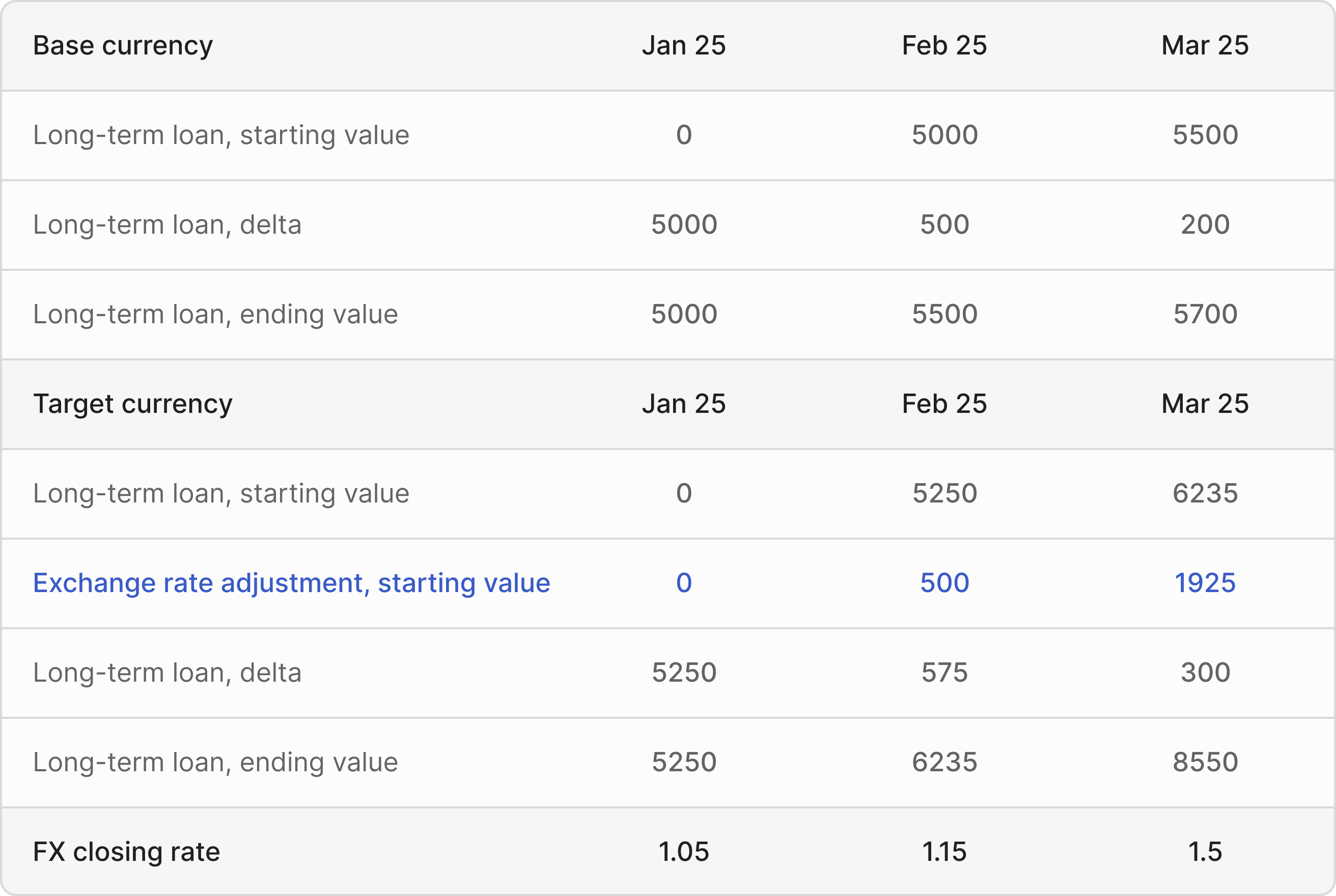
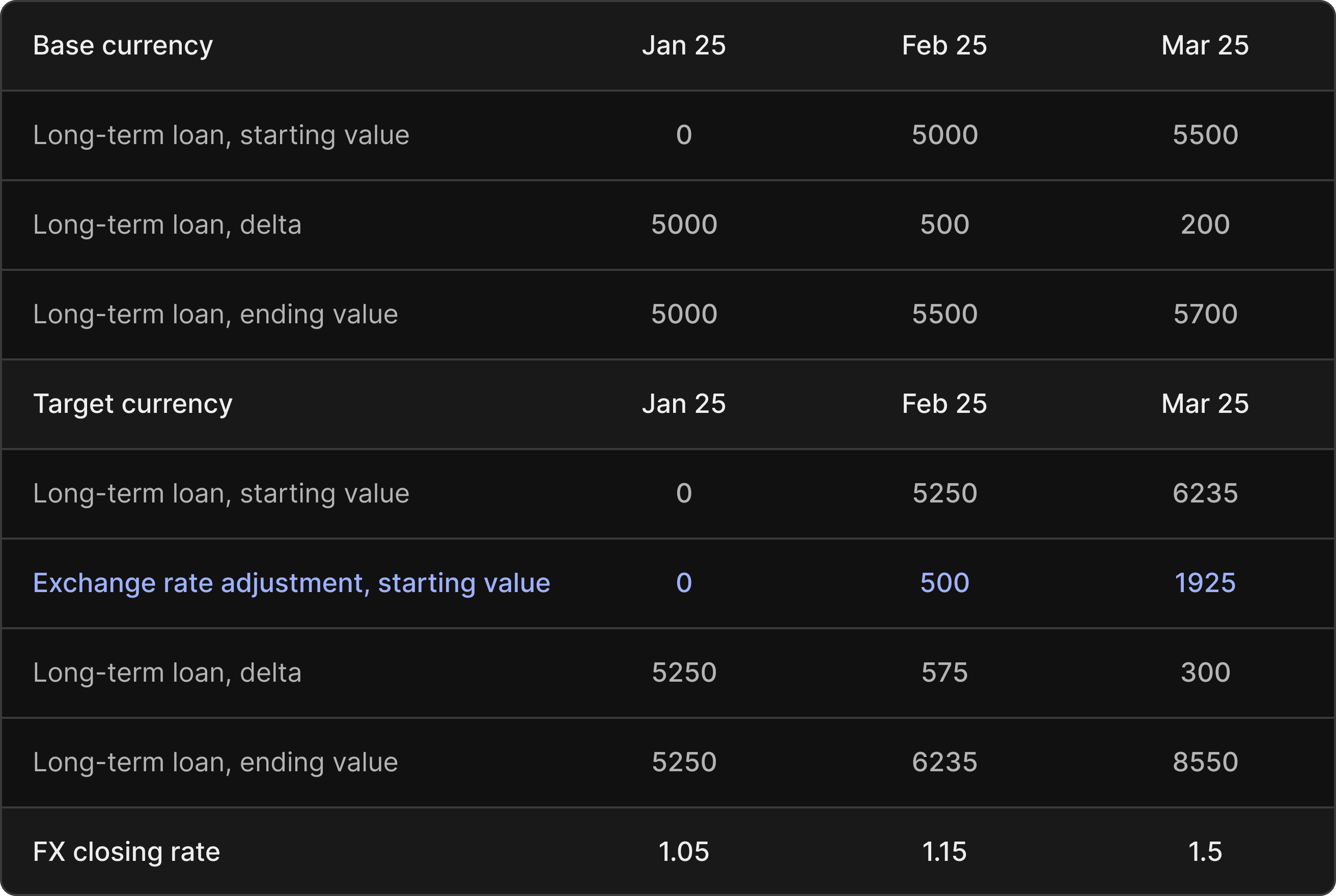
Opening balance sheet amounts are translated at the current month’s closing rate. This can cause balance sheet values to fluctuate due to exchange rate changes alone, even without new transactions. In practice, it means your balance sheet will reflect both financial movements and currency adjustments.
In the example below, we demonstrate how to calculate the exchange rate effect resulting from fluctuating exchange rates.
```
// Calculating exchange rate adjustment, starting value
5000 * (1.15 - 1.05) = 500
```
 #### Effect 2: Average and closing rates
While P\&L items are translated at average monthly rates, their corresponding balance sheet entries are translated at closing rates. As a result, the P\&L and balance sheet may use slightly different exchange rates for the same underlying transactions.
In the example below, we demonstrate how the difference between average and closing rates effects the equity account for retained earnings.
```
// Exchange rate effect, average to closing rates
5000 * (1.10 - 1.05) = 250
```
#### Effect 2: Average and closing rates
While P\&L items are translated at average monthly rates, their corresponding balance sheet entries are translated at closing rates. As a result, the P\&L and balance sheet may use slightly different exchange rates for the same underlying transactions.
In the example below, we demonstrate how the difference between average and closing rates effects the equity account for retained earnings.
```
// Exchange rate effect, average to closing rates
5000 * (1.10 - 1.05) = 250
```
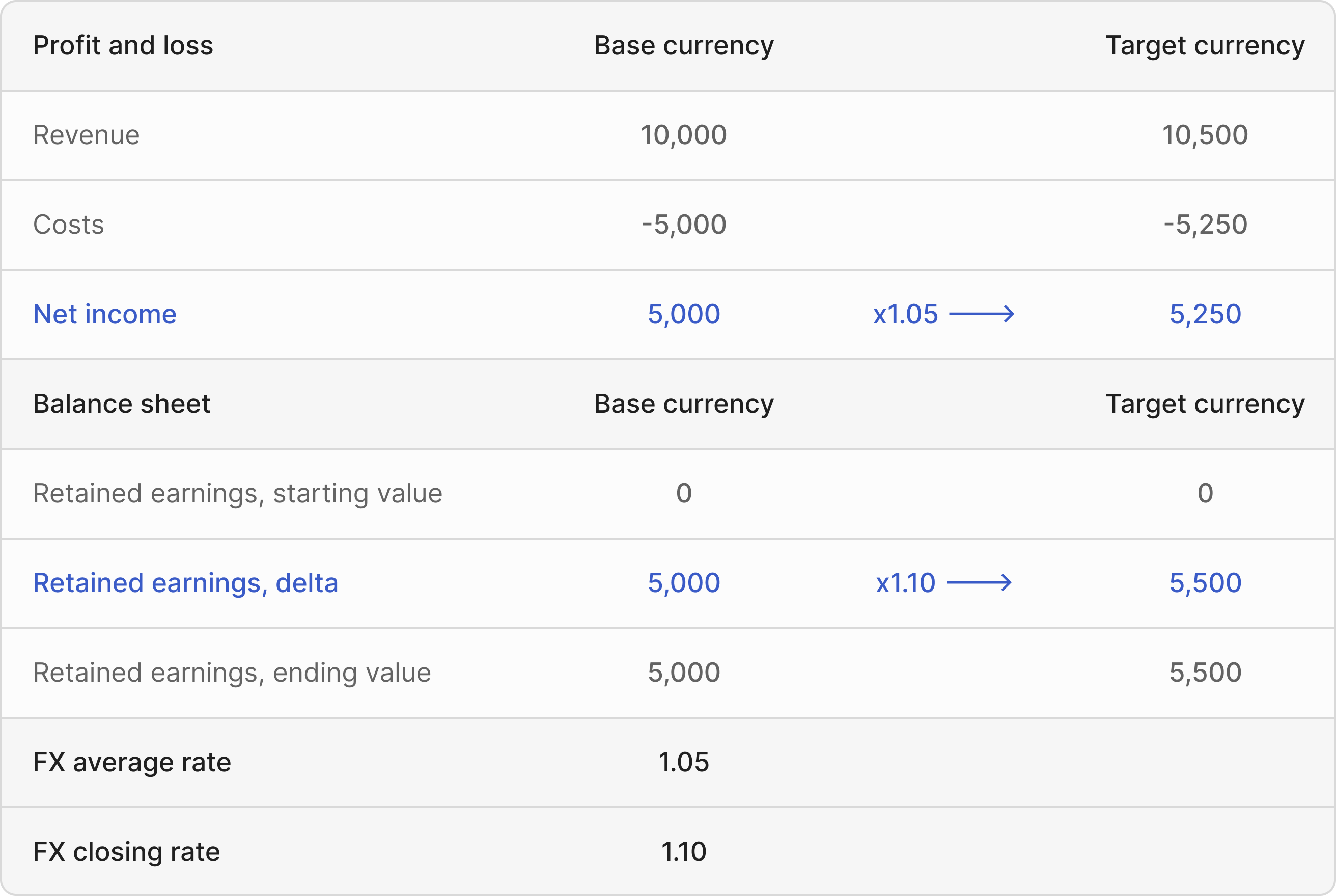
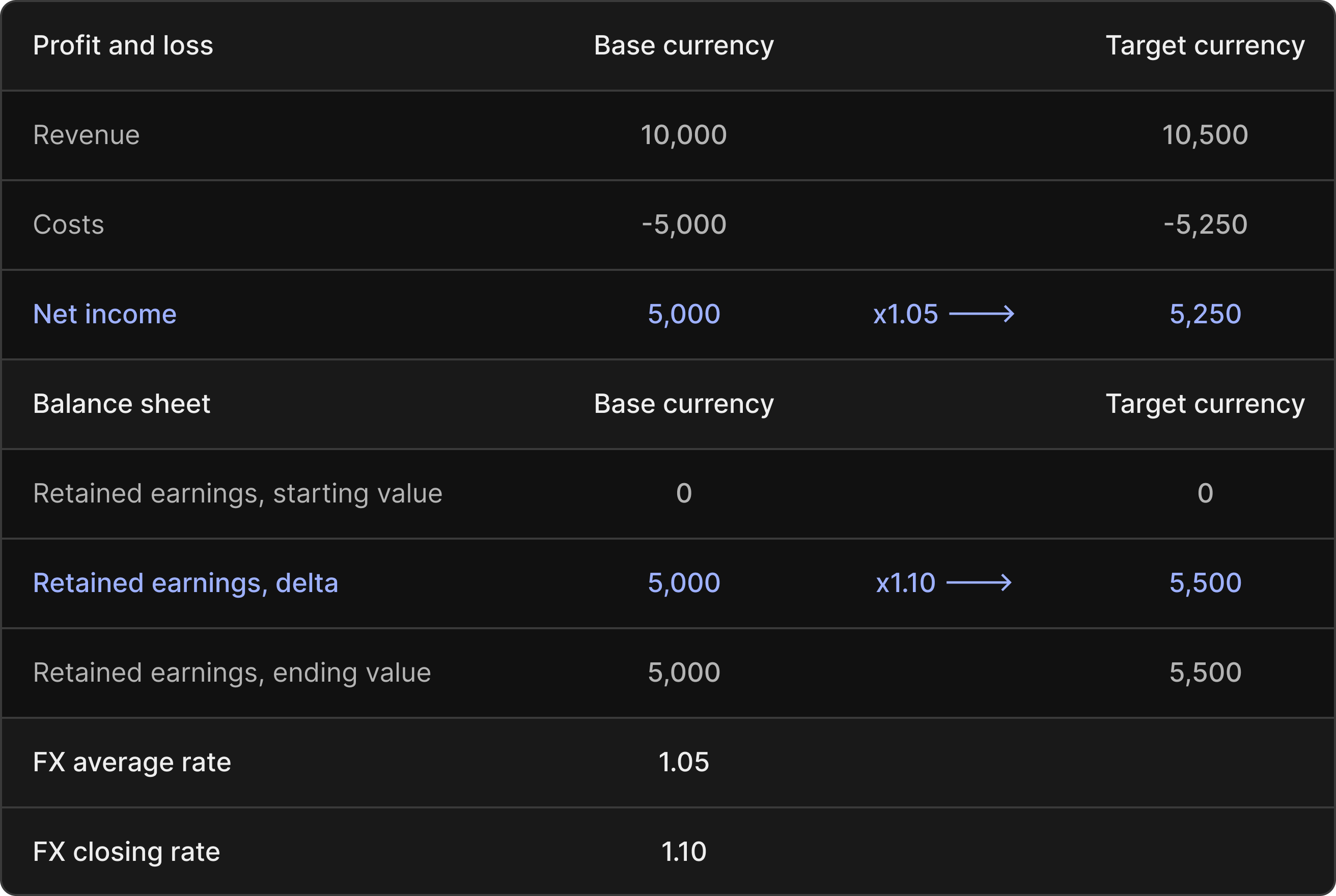 The **5,500** difference in retained earnings, expressed in your target currency, breaks down into **5,250** (retained earnings at average rates) and **250** (the adjustment from average to closing rate). This adjustment follows the method shown above.
### IAS21 compliance
IAS 21.42 specifies that exchange rate differences related to equity should appear as a separate equity component called “Other Comprehensive Income.” This differs from Francis’ standard approach, but it’s easy to configure Francis to comply with IAS21 guidelines. Refer to the provided [guide](/masterclasses/currency/ias21) for instructions on adopting this accounting standard.
The **5,500** difference in retained earnings, expressed in your target currency, breaks down into **5,250** (retained earnings at average rates) and **250** (the adjustment from average to closing rate). This adjustment follows the method shown above.
### IAS21 compliance
IAS 21.42 specifies that exchange rate differences related to equity should appear as a separate equity component called “Other Comprehensive Income.” This differs from Francis’ standard approach, but it’s easy to configure Francis to comply with IAS21 guidelines. Refer to the provided [guide](/masterclasses/currency/ias21) for instructions on adopting this accounting standard.